



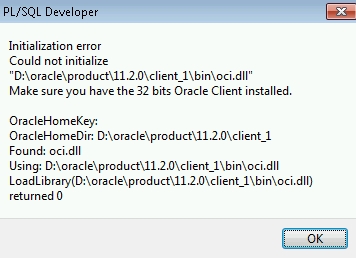
After I installed the latest version of PL/SQL Developer on my Windows 7 64bit machine today, I got the following error message when trying to connect to an Oracle database:
Initialization error
Could not initialize "D:\oracle\product\11.2.0\client_1\bin\oci.dll"
Make sure you have the 32 bits Oracle Client installed.
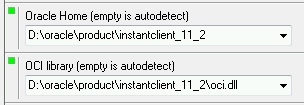
As I’ve found out, the solution is to install (actually, simply extracting the archive is enough) the latest 32bit version of the Oracle Instant Client and configure PL/SQL Developer to use it instead of the 64bit Oracle client under Tools – Preferences.
I found this solution here: Fix Initialization Error: LoadLibrary oci.dll returned 0 while trying to connect to Oracle using PL/SQL Developer.
However, PL/SQL Developer didn’t recognize my tnsnames.ora anymore after I switched to the 32bit Instant Client. The solution is pretty simple: just create the directory network\admin in the 32bit Instant Client’s directory and copy your tnsnames.ora from the real Oracle client’s directory there.
It worked great! I even didn’t change in tnsnames.ora. thanks for the blog!
Thanks, that was very fast and helpful
Hi!
I had the same problem
I juts did what you said. It worked once, when I firs logged in yesterday!
But today, I tried to log in again, there was de following message error:
“ORA-12514 TNS:listener does not currently know of service requested in connect descriptor.”
Do you know what can I do to solve it?
Best regards,
Mary
Great it works! Many Thanks 🙂
Thanks for Good friend!
It works for me!
Great tip. Keep up the good work!
Tks.
Rob
I´ve followed these steps, I already can see the databases of the tnsnames.ora file in the database combobox, but when I try to connect to some database I´m getting an error: ORA-12705: Cannot access NLS data files or invalid environment specified.
What should I do?
Thank you, it works just fine.
Thanks a lot.. Its working fine now 🙂
Awesome information…Don’t need to install complete DB client. Just extract this instant client, create folders and copy tns and sql net files. configure oci .dll path in PL SQL Developer preferences. That’s it. Thanks a ton…!!
You’re welcome! 🙂