Permanently setting Windows environment variables from scripts (e.g. PowerShell)

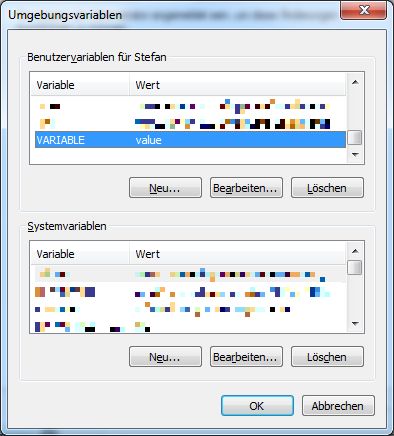
To permanently set Windows environment variables (e.g. PATH) from a (PowerShell) script, you can use setx or Set-ItemProperty like this (for the current user): setx VARIABLE value Set-ItemProperty -Path ‘Registry::HKEY_CURRENT_USER\Environment’ -Name VARIABLE -Value “value” And here is the result:

Enable daily Java Updates in Windows 7 (64bit)

Java has had quite a few security issues recently. Therefore, it definitely makes sense to enable the Java Updater and to install every Java update right after Oracle releases it. However, on my different Windows (64bit) boxes I could not configure the Java Updater. There was simply no “Update” tab in the Java control panel. [...]

System error 5 when accessing a network share on Windows 2008 using a DNS alias name

When I tried to access a network share on a Windows 2008 server locally (!) today using a DNS alias I configured, I got System error 5 has occurred. Access is denied (Systemfehler 5 aufgetreten. Zugriff verweigert in German): As you see in the screenshot, the shares are enumerated correctly when using the server’s computer [...]

PowerShell: Check whether a Windows command or executable is available

In one of my recent PowerShell scripts I needed to find out if certain commands (in my case “svn”, “git”, “ant” and “mvn”) were available or not. I wrote this small function that tries to call the given command and returns whether it is callable. function commandAvailable($cmd, $options) {   $error.clear();   $ErrorActionPreference = "silentlycontinue"; [...]

Connecting to an Oracle database via ODBC using only the InstantClient

Until today, I thought to be able to connect to an Oracle database from your Windows machine, you need to install the complete Oracle client including the Enterprise Manager etc. (>1GB). However, today I finally found a way to use Oracle via ODBC using only the InstantClient (ca. 50MB) on the Oracle website: First of [...]

PowerShell: How to read contents from text files without converting the lines into an array

Apparently, PowerShell’s get-content cmdlet automatically converts the contents of text files into an array of strings, splitting the contents at the line breaks (see Using the Get-Content Cmdlet). In many cases this is convenient: Contents of file test.txt: 1 2 3 gc text.txt | % { write-host “line: ” $_ } line: 1 line: 2 [...]

Getting PL/SQL Developer on Windows 7 64bit to connect to an Oracle database

After I installed the latest version of PL/SQL Developer on my Windows 7 64bit machine today, I got the following error message when trying to connect to an Oracle database: Initialization error Could not initialize “D:\oracle\product\11.2.0\client_1\bin\oci.dll” Make sure you have the 32 bits Oracle Client installed. As I’ve found out, the solution is to install [...]

Installation of Microsoft Baseline Security Analyzer (MBSA) fails with error code 2738

When installing Microsoft Baseline Security Analyzer (MBSA) the installation on my Windows 7 64bit machine failed with error code 2738. However, I found the solution for this problem in the Chip forum: Remove the registry key HKEY_CURRENT_USER\SOFTWARE\Classes\Wow6432Node\CLSID\. Register vbscript.dll running regsvr32 C:\Windows\SysWOW64\vbscript.dll as Administrator.

Changing the path to the key files in GnuPG for Windows

GnuPG for Windows 7 stores all its key files in %USERPROFILE%\AppData\Roaming\gnupg, but I wanted to change this path, say to D:\Profile\GPG, so that the files can easily be backed up. It turns out, there are quite a few different methods to change the path: changing the default keyring location in windows. I chose to change [...]

How to verify the integrity of a PuTTY executable

I am used to verify downloaded programs with GnuPG simply by entering the following command: gpg2 –verify program.exe.sig Usually, GnuPG finds out which file to hash (in this case program.exe) on its own. But in case of PuTTY, all I got was this: gpg2 –verify .\putty.exe.DSA gpg: keine signierten Daten gpg: can’t hash datafile: Keine [...]